
Previously, we looked at how to create a survey using Microsoft Forms Pro. In this post, we will look at how to embed a Forms Pro survey inside a Power Apps Canvas App. This can be very useful if you want people to fill out surveys using an app, which can be very convenient.
If you prefer to learn by video, check out my YouTube channel video:
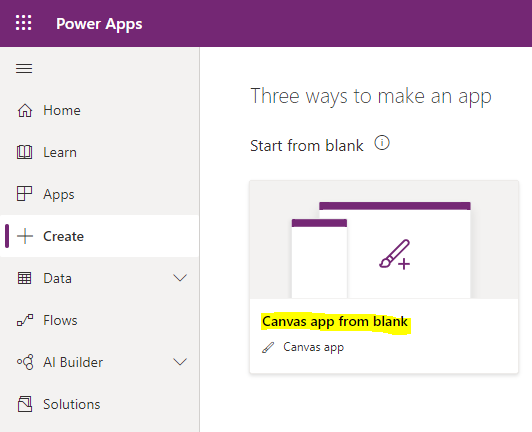
First, log into the Power Apps maker at https://make.powerapps.com/ and let’s create a new Canvas app from blank:
Give the app a name, e.g. Forms Pro Survey:

Navigate to Insert, and select Input, then Forms Pro Survey (Preview):

On the right, click on No data:
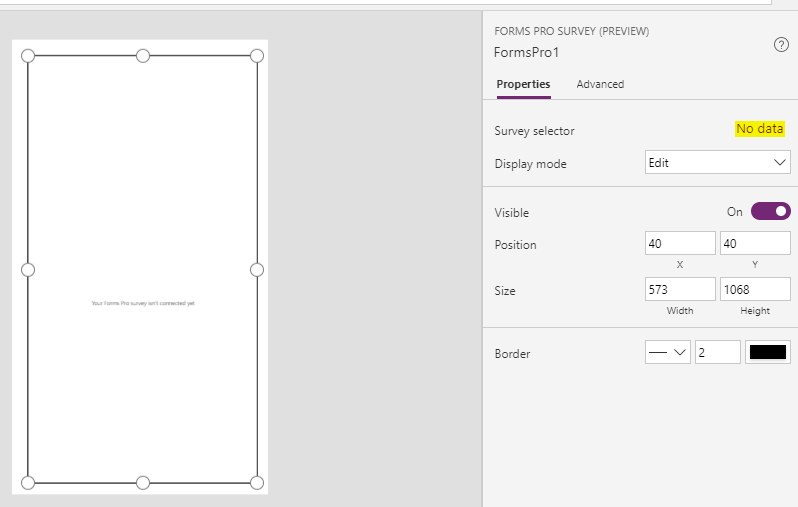
Select your Forms Pro survey. This is the one we created earlier:


Let’s play this app to see how it looks:

We see the survey is embedded in the Canvas app:

Let’s Save it so we can test it out on a mobile device:

Log into the Power Apps app on your phone. We see the new Forms Pro Survey app:

We need to grant permission to Forms Pro:

Once confirmed, we see our Forms Pro survey:


That’s it! We can now get users to fill out a Forms Pro survey using a Canvas Power App.
HOW TO EMBED FORMS PRO INSIDE A POWER APPS CANVAS APP