
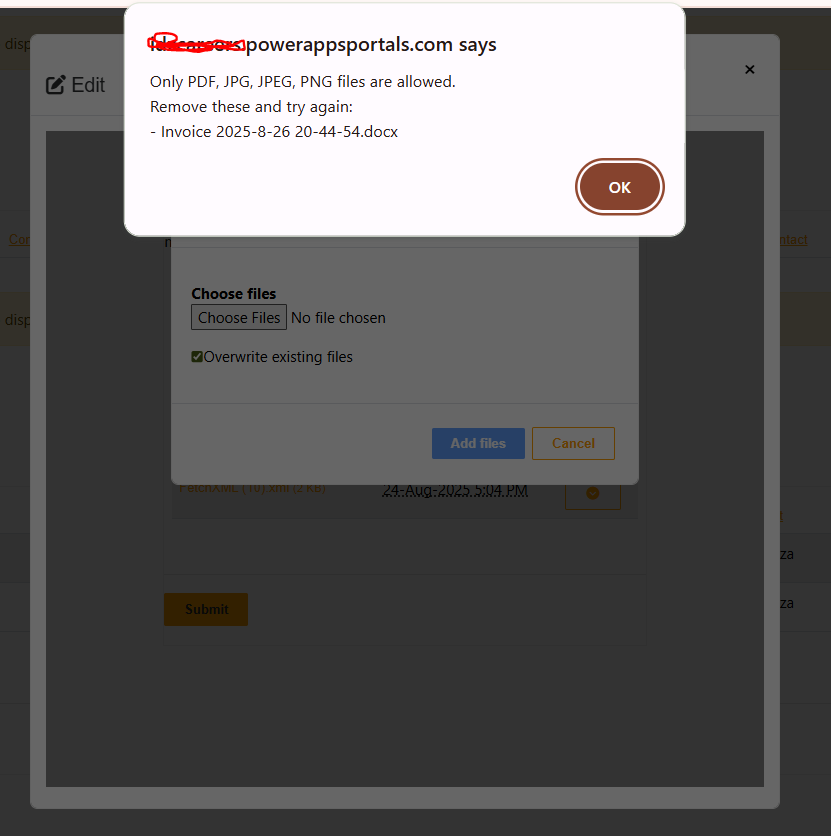
When working with Power Pages (formerly Power Apps Portals), file uploads are often required in scenarios like submitting resumes, attaching invoices, or uploading supporting documents. However, unrestricted file uploads can lead to security risks and storage issues. A good practice is to restrict users to upload only specific file types such as PDF, JPG, or PNG.
In this blog, I’ll walk you through how to implement file upload restrictions in Power Pages using JavaScript.
$(document).ready(function () {
    debugger
    (function ($) {
  // ✅ Allowed extensions
  var allowedExt = ["pdf", "jpg", "jpeg", "png"];

  // Utility: check extension
  function isAllowed(name) {
    if (!name) return false;
    var ext = name.split(".").pop().toLowerCase();
    return allowedExt.indexOf(ext) !== -1;
  }

  // Mark non-allowed rows
  function flagInvalidRows(scope) {
    $(scope).find('tbody tr.sp-item').each(function () {
      var $row = $(this);
      var name = ($row.data('filename') || '').toString();

      if (!isAllowed(name)) {
        $row.addClass('invalid-row');
        $row
          .find('a.sharepoint-custom-icon')
          .attr('title', "Only PDF, JPG, JPEG, PNG files are allowed (" + name + " blocked)")
          .attr('aria-disabled', 'true');
      }
    });
  }

  // 1) Block clicks on invalid files
  $(document).on('click', 'tbody tr.sp-item a.sharepoint-custom-icon', function (e) {
    var $row = $(this).closest('tr.sp-item');
    var name = ($row.data('filename') || '').toString();

    if (!isAllowed(name)) {
      e.preventDefault();
      e.stopImmediatePropagation();
      alert("Only PDF, JPG, JPEG, PNG files are allowed.nBlocked: " + name);
      return false;
    }
  });

  // 2) On first load
  $(function () {
    flagInvalidRows(document);
  });

  // 3) Watch for dynamic changes (uploads/refresh)
  var tbody = document.querySelector('.sharepoint-data table tbody');
  if (tbody) {
    new MutationObserver(function (mutations) {
      var changed = false;
      mutations.forEach(function (m) {
        if (m.addedNodes && m.addedNodes.length) changed = true;
      });
      if (changed) flagInvalidRows(tbody);
    }).observe(tbody, { childList: true, subtree: true });
  }

  // 4) Block invalid file uploads
  $(document).on('change', 'input[type="file"]', function (e) {
    var files = this.files;
    if (!files || !files.length) return;

    var invalid = [];
    for (var i = 0; i < files.length; i++) {
      var fname = files[i].name || '';
      if (!isAllowed(fname)) invalid.push(fname);
    }

    if (invalid.length) {
      alert("Only PDF, JPG, JPEG, PNG files are allowed.nRemove these and try again:n- " + invalid.join("n- "));
      $(this).val(''); // reset input
      e.preventDefault();
      e.stopImmediatePropagation();
      return false;
    }
  });

})(window.jQuery || jQuery);


});
Allow users to upload only specific extension files in Power Pages