
When creating a page containing an Entity List (or just List) in Power Apps Portals, it is very common to add a details page so users can drill-down to the records details.
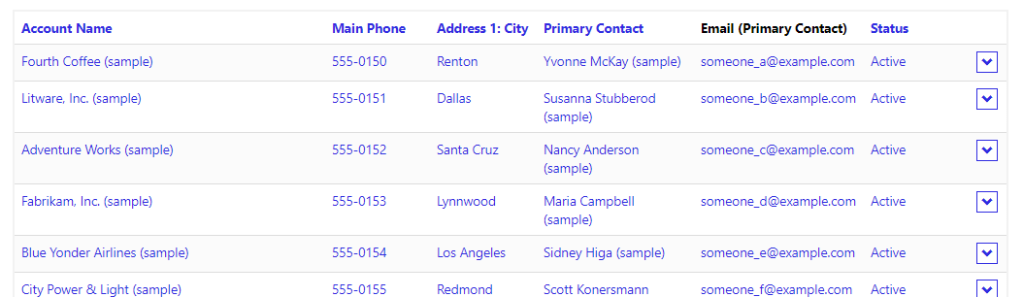
The list is represented as below example:

By default, the first column contains the link to the details Web Page as well as the action menu on the right dropdown.
In this post, I will share two options for JavaScript/jQuery code to make the entire row clickable.
Solution 1 – Making each cell clickable
In this example, we will perform the following:
- Loop through the list, retrieving the URL for record details each row
- Then we will loop through each individual cell, and attach an <a> element to represent the link
- The code also needs to ignore the TD containing the dropdown (optionally this can be removed)
SetLinkAllCells = function() {
varentityList = $(".entitylist.entity-grid").eq(0);
 entityList.on("loaded", function() {
   entityList.find("table tbody > tr").each(function(index, tr) {
                    varprimaryColumn = $(tr).find('td')[0];
      /// or retrieve column by name
  /// var primaryColumn = tr.find('td[data-attribute="name"]');
    varurl = $(primaryColumn).find("a")[0].href;
     console.log("URL: "+ url);            if(!!url) {
        $(tr).find('td').each(function(index, td) {
               /// ignore action menu / dropdown
   if($(td).attr("aria-label") == "action menu")
            return;
  varcellValue = $(td).text();
      /// clear td value
  $(td).text("");
 varnewElement = '<a href="'+ url + '" class="details-link has-tooltip" data-toggle="tooltip">'+ cellValue + '</a>';
  $(td).append(newElement);
   });
       }
  });
  });};
Solution 2 – Making the table row clickable
In this example, we will perform the following:
- Loop through the list, retrieving the URL for record details each row
- Attach a new function to the click event of the row, redirecting the user to the URL
- Remove the action menu, as this will also be triggered on the row click event
- Set the cursor to pointer for better UX
SetLinkAllRow = function(){
varentityList = $(".entitylist.entity-grid").eq(0);
 entityList.on("loaded", function() {
  entityList.find("table tbody > tr").each(function(index, tr) {
                    varprimaryColumn = $(tr).find('td')[0];
        /// or retrieve column by name
   /// var primaryColumn = tr.find('td[data-attribute="name"]');
      varurl = $(primaryColumn).find("a")[0].href;
  console.log("URL: "+ url);            if(!!url) {
          $(tr).css("cursor","pointer")
 // remove menu dropdown
 $(tr).find('td[aria-label="action menu"]').remove();

     $(tr).click(function(){
          window.location.href = url;
       });
 }
   });
 });};
Now all we need is to use the preferred method:
$(document).ready(function() {
  //SetLinkAllRow();
// or
  //SetLinkAllCells();
});
POWER APPS PORTALS – ENTITY LIST: MAKING THE ENTIRE ROW CLICKABLE